I've uploaded a new test version of Total Tactical Warfare. It includes all the updates since the last test version.
Changes:
- MG's and sniper rifles
- weight effects
- improved soldier behavior
- campaign support
- new training system
- high scores
- new sound system
Here's a link to the download:
TTW.zip (36MB)
For it to work you'll need the .net Framework 2.0 and DirectX 9.
It would be great if you could try it and tell me what you think :)
Saturday, December 1, 2007
Friday, November 16, 2007
Scriptable AI
I've added some new objects to the map editor that will allow mission designers to control what the computer player does.
The objects include: AIPlayer, AISquad, AISoldier, AIWaypoint
The picture shows the new objects in the map editor.

When the game loads soldiers and waypoints are assigned to a squad. When the game starts the squad follows the waypoints until the last waypoint is reached.
Waypoints have a number of properties:
- radius (squad inside radius has reached the waypoint)
- squad ID (squad that will move along this waypoint)
- waypoint number (0,1,2... determines the order in which waypoints are moved along. The squad will stop moving at last waypoint)
- TimeToRemainAtWaypoint (time the squad waits at the waypoint before continueing to next waypoint)
- StanceOnArrive (Prone, Crouch, Standing)
- StanceOnLeave (Prone, Crouch, Standing)
- MoveIntoBuilding (True, False)
- BuildingLevel (0,1,...)
The video shows soldiers following waypoints and acting according to the properties.
The objects include: AIPlayer, AISquad, AISoldier, AIWaypoint
The picture shows the new objects in the map editor.

When the game loads soldiers and waypoints are assigned to a squad. When the game starts the squad follows the waypoints until the last waypoint is reached.
Waypoints have a number of properties:
- radius (squad inside radius has reached the waypoint)
- squad ID (squad that will move along this waypoint)
- waypoint number (0,1,2... determines the order in which waypoints are moved along. The squad will stop moving at last waypoint)
- TimeToRemainAtWaypoint (time the squad waits at the waypoint before continueing to next waypoint)
- StanceOnArrive (Prone, Crouch, Standing)
- StanceOnLeave (Prone, Crouch, Standing)
- MoveIntoBuilding (True, False)
- BuildingLevel (0,1,...)
The video shows soldiers following waypoints and acting according to the properties.

Tuesday, November 13, 2007
High Scores
I've added a High Score list to the main menu. High Scores are added and shown if you complete a map or a campaign with a good score. The High Scores add replay value to the missions. They also allow you to compare your skills with other players.


Friday, November 9, 2007
Campaigns & M240
Total Tactical Warfare now supports linear single player campaigns. I've added all the necessary menus and even the ability to play videos before and after missions. The campaign menu is shown in the screenshot.

Striker made a nice M240 model. I skinned it. Check out the render below


Striker made a nice M240 model. I skinned it. Check out the render below

Friday, November 2, 2007
Training
There are three types of training available for soldiers in Total Tactical Warfare. Basic Training, Class Training and Ability Training.
Basic Training (Example: Survival Training)
-requires skill points (you get them when you level up)
-upgrades skills
Class Training (Example: Sniper Training)
-requires certain skill levels
-allows use of special weapons
-only one Class Training allowed per soldier
Ability Training (Example: Grenade Training)
-requires certain skill levels
-allows use of special weapons and abilities
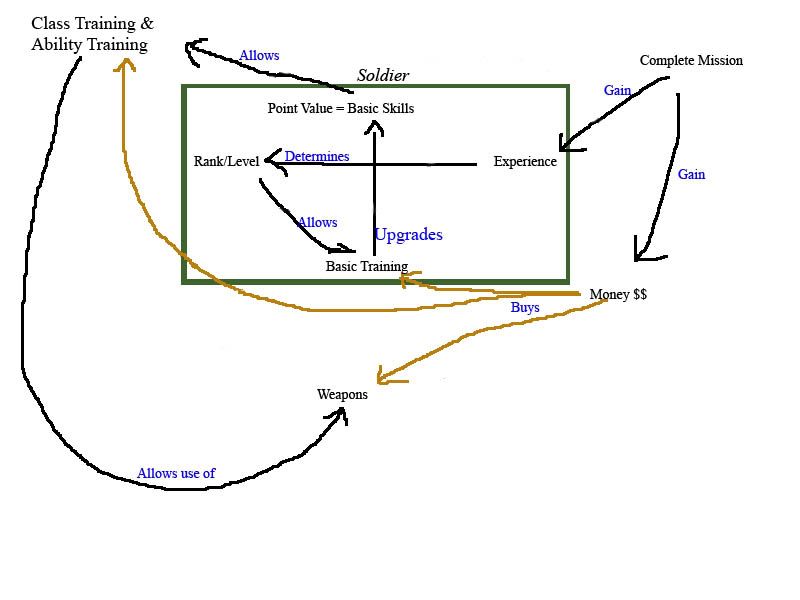
Check out the image below for an overview of the training system
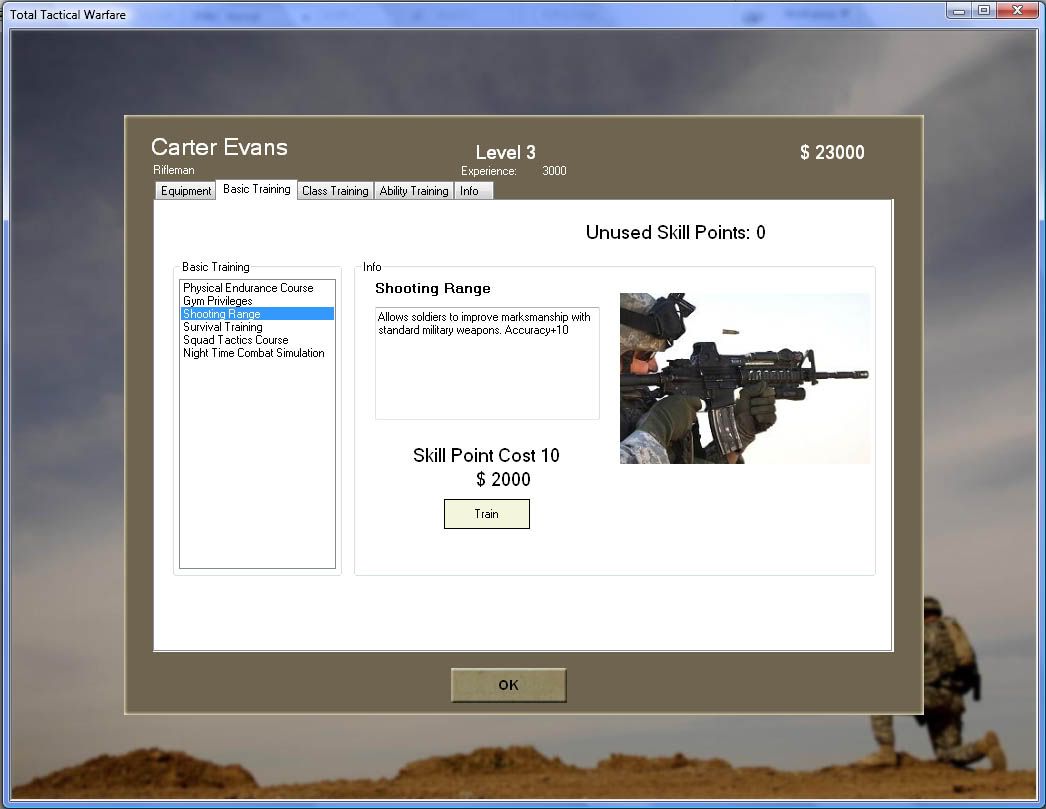
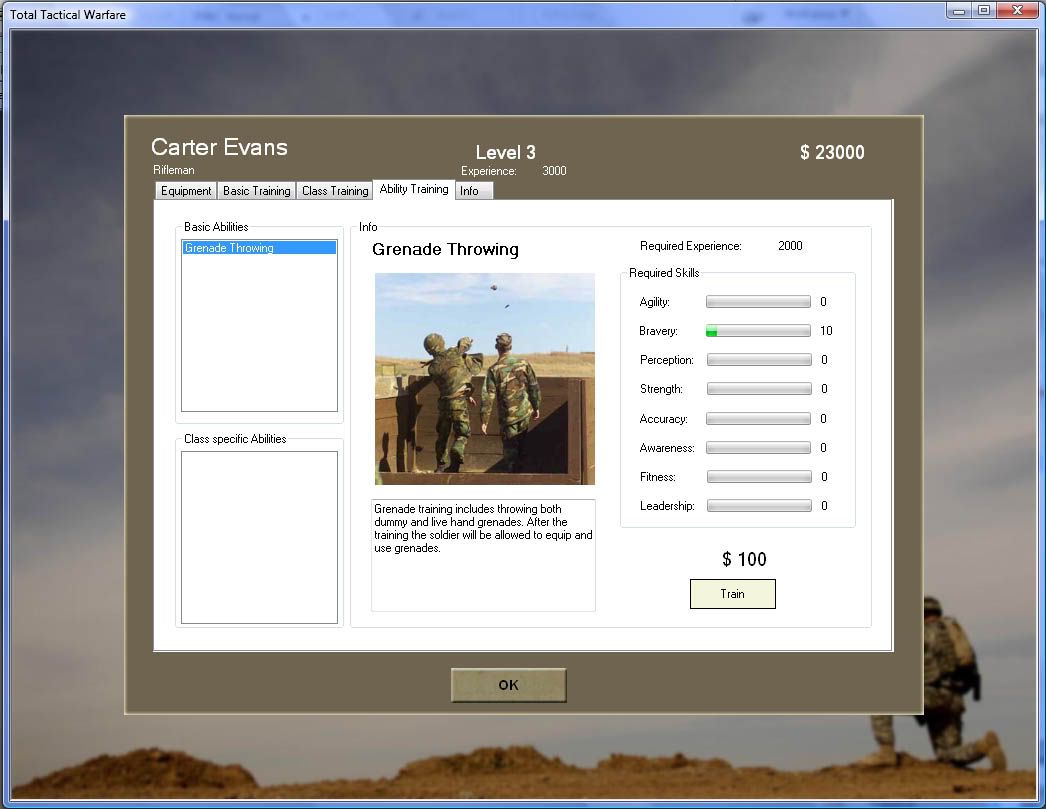
I added new menus for the new training types. Striker came up with some basic training activities, complete with pictures. I also improved the response time of the main menu a lot. Before i was using the "transparent" background color on nearly all of my controls. That allowed me to have a custom background texture. Unfortunately that also meant that the controls had to do a lot of transparancy calculations. Now the background is one color and no more extra calculations are needed.

Basic Training (Example: Survival Training)
-requires skill points (you get them when you level up)
-upgrades skills
Class Training (Example: Sniper Training)
-requires certain skill levels
-allows use of special weapons
-only one Class Training allowed per soldier
Ability Training (Example: Grenade Training)
-requires certain skill levels
-allows use of special weapons and abilities
Check out the image below for an overview of the training system
I added new menus for the new training types. Striker came up with some basic training activities, complete with pictures. I also improved the response time of the main menu a lot. Before i was using the "transparent" background color on nearly all of my controls. That allowed me to have a custom background texture. Unfortunately that also meant that the controls had to do a lot of transparancy calculations. Now the background is one color and no more extra calculations are needed.
Subscribe to:
Posts (Atom)